An ad-free Alarmy alternative for Android
If you want an alarm clock that actually wakes heavy sleepers—without ads, subscription prompts, or clutter—here is how Repeat Alarm: Clock-It compares with Alarmy.
TL;DR
Alarmy is built around wake-up missions (math, barcode scans, photos) with a freemium ad and subscription model. Repeat Alarm: Clock-It takes a simpler route on Android: it is ad-free and schedules an entire sequence of repeating interval alarms from one setup (for example, 6:00 AM to 6:45 AM every 2 minutes) with optional random ringtones and force-loud volume.
Why Android users look for an Alarmy alternative
Alarmy popularized mission-based wake-up alarms, and for people who specifically need to walk across the room to scan a barcode, that mechanic works well. Still, many Android users eventually look for a lighter replacement for three practical reasons:
Ads on the free tier
Seeing ads or upgrade prompts when you are half-asleep and just trying to set or stop an alarm breaks trust in a morning utility.
Subscription paywalls
Removing ads and unlocking Pro features requires a recurring subscription, which feels heavy when all you need is a reliable wake-up alarm.
App bloat & setup friction
Not everyone wants sleep tracking, morning horoscopes, or puzzles—sometimes you just want multiple loud alarms scheduled fast.
Repeat Alarm: Clock-It vs. Alarmy
Here is a straightforward breakdown of how the two apps differ in setup, pricing model, and wake-up mechanics.
Platform
Repeat Alarm: Clock-It
Android
Alarmy
Android & iOS
Core wake-up approach
Repeat Alarm: Clock-It
Repeating interval window (every 1–30+ min) from one setup
Alarmy
Single alarm + wake-up missions (math, barcode, photo, squats)
Ads
Repeat Alarm: Clock-It
Ad-free
Alarmy
Ads on the free tier; paid subscription removes ads
Pricing model
Repeat Alarm: Clock-It
Free to download on Google Play
Alarmy
Freemium with paid subscription tiers for Pro features
Setting multiple alarms
Repeat Alarm: Clock-It
Pick start time, end time & interval once—auto-generates every ring time
Alarmy
Create alarms individually
Alarm list organization
Repeat Alarm: Clock-It
One card & single toggle per time-window sequence
Alarmy
Separate entry for each alarm
Sound & volume options
Repeat Alarm: Clock-It
Random or specific ringtone, optional force-loud volume, custom message
Alarmy
Loud ringtones, mission sound options, wake-up check (Pro/tier dependent)
UI & themes
Repeat Alarm: Clock-It
Minimal Material 3 Expressive in light & dark modes
Alarmy
Feature-dense alarm, sleep, and morning routine hub
Best for
Repeat Alarm: Clock-It
Heavy sleepers, ADHD routines, study blocks & people tired of ads/clutter
Alarmy
People who specifically want barcode, photo, or math puzzle tasks
| Feature | Repeat Alarm: Clock-It | Alarmy |
|---|---|---|
| Platform | Android | Android & iOS |
| Core wake-up approach | Repeating interval window (every 1–30+ min) from one setup | Single alarm + wake-up missions (math, barcode, photo, squats) |
| Ads | Ad-free | Ads on the free tier; paid subscription removes ads |
| Pricing model | Free to download on Google Play | Freemium with paid subscription tiers for Pro features |
| Setting multiple alarms | Pick start time, end time & interval once—auto-generates every ring time | Create alarms individually |
| Alarm list organization | One card & single toggle per time-window sequence | Separate entry for each alarm |
| Sound & volume options | Random or specific ringtone, optional force-loud volume, custom message | Loud ringtones, mission sound options, wake-up check (Pro/tier dependent) |
| UI & themes | Minimal Material 3 Expressive in light & dark modes | Feature-dense alarm, sleep, and morning routine hub |
| Best for | Heavy sleepers, ADHD routines, study blocks & people tired of ads/clutter | People who specifically want barcode, photo, or math puzzle tasks |
How Clock-It wakes heavy sleepers without missions
Most people oversleep because a single alarm leaves a quiet gap after they hit Dismiss. Clock-It solves that by letting you define a time window and a repeat interval in one screen—then ringing persistently across the entire window.
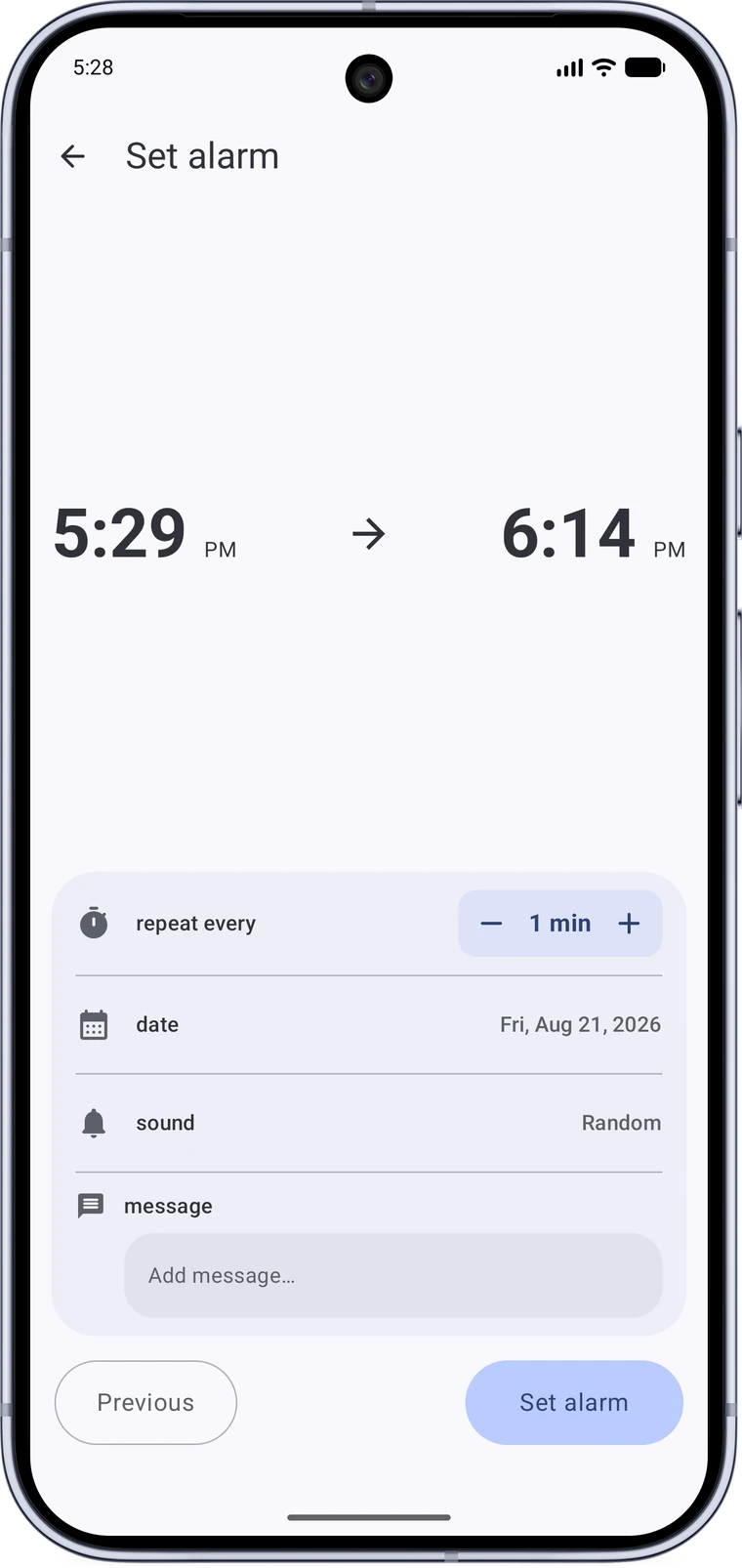
Step 1
Set window & interval
Pick a start time, end time, interval (like 1, 2, or 5 min), date, random or specific sound, and an optional message.
Step 2
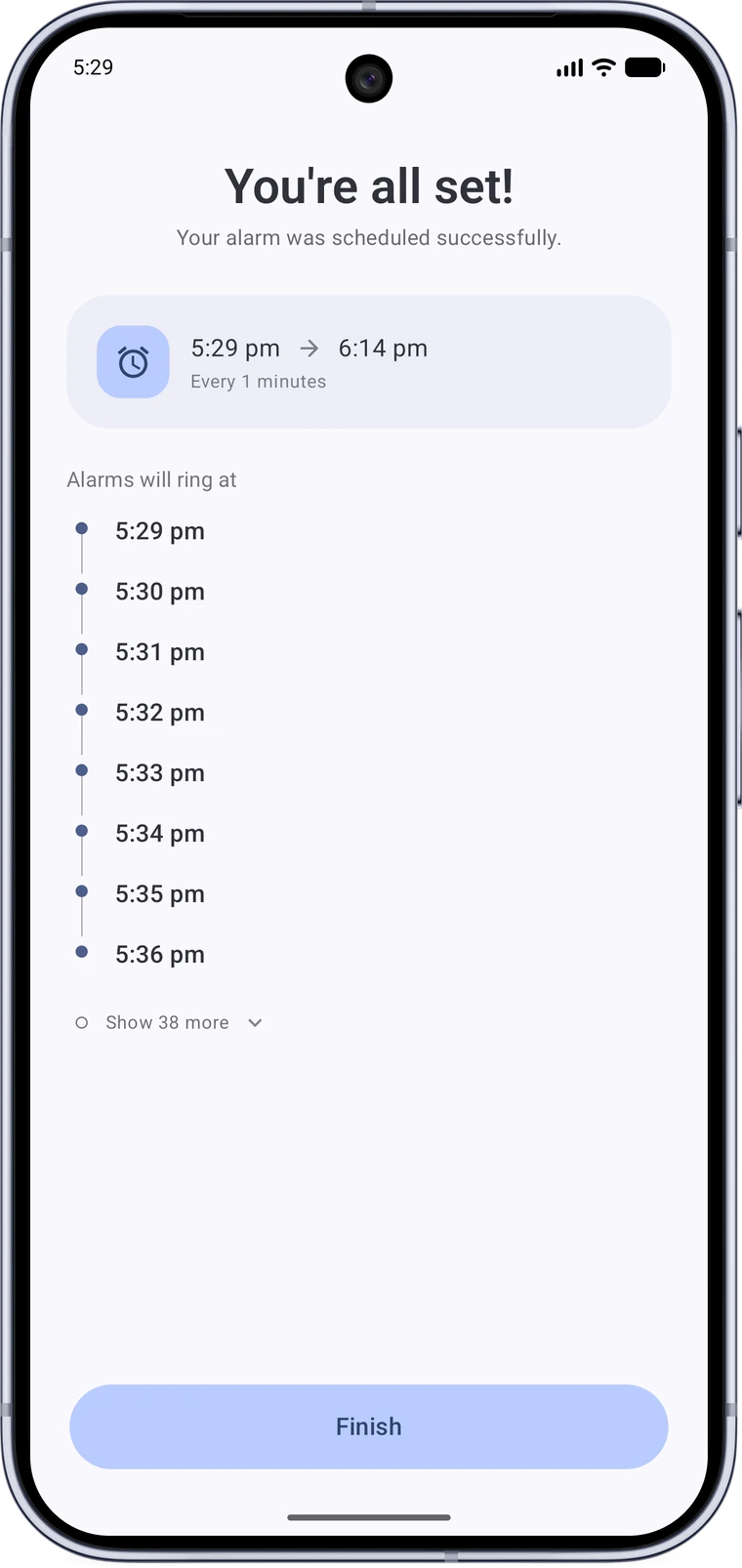
Every ring time scheduled
Clock-It generates the full sequence automatically and displays every exact ring time in one tidy confirmation list.
Step 3
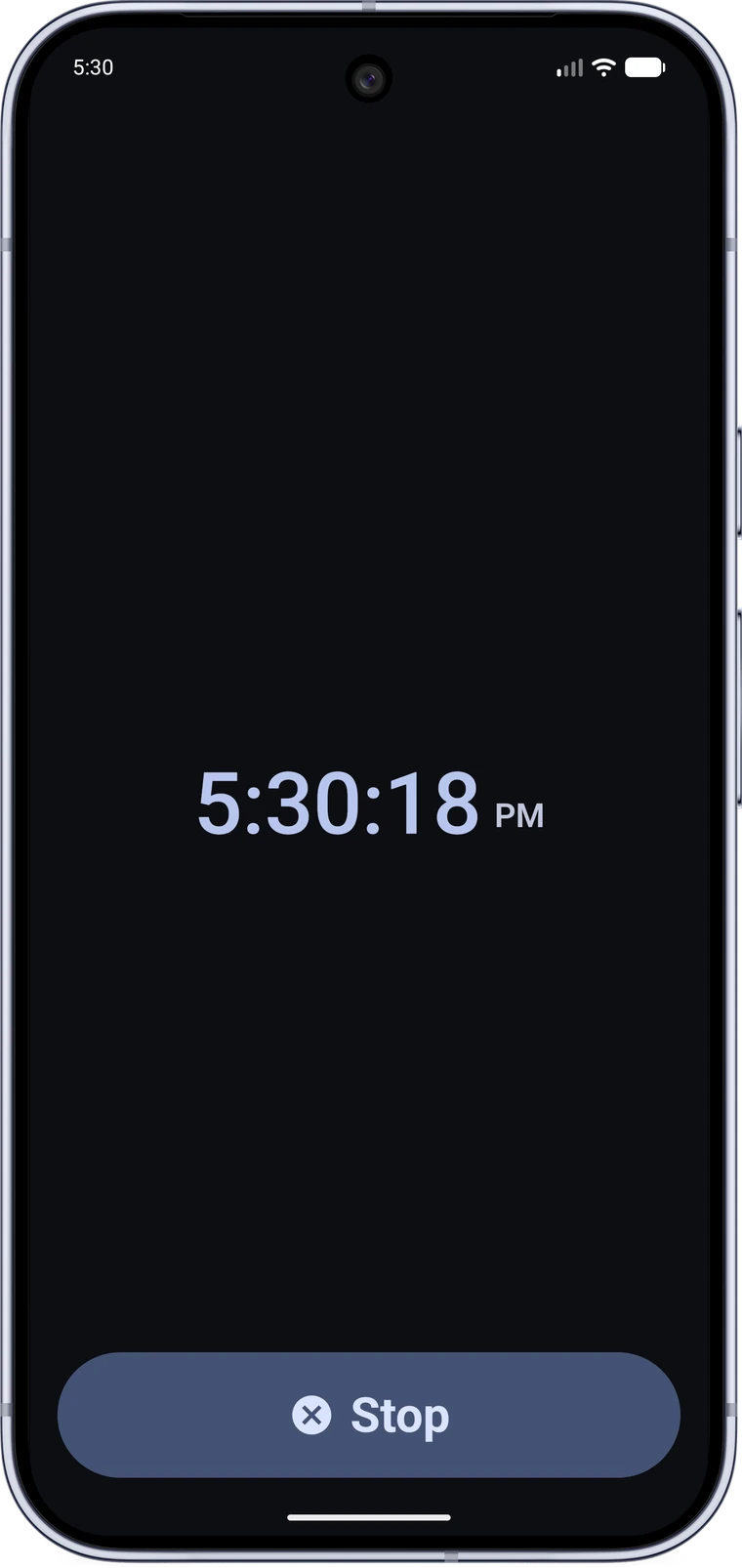
Loud full-screen ringing
Full-screen light or dark ringing with optional force-loud volume and random tones so your brain does not tune out one sound.
When Alarmy (or another app) is still the better choice
Clock-It is intentionally minimal, which means it does not try to cover every feature Alarmy offers. You should stick with Alarmy or another specialized tool if you need:
- Physical or cognitive missions: Clock-It has no barcode scanning, photo matching, squat counters, or math problems.
- Sleep tracking or smartwatches: Clock-It focuses solely on reliable interval alarm scheduling, not overnight sleep analysis.
- iPhone / iOS support: Clock-It is currently Android-only.
Frequently asked questions
Clock-It is ad-free, free to download on Google Play, and uses a single start-to-end interval setup instead of ads, subscription prompts, or complex setup menus. It keeps you from falling back asleep by ringing repeatedly every few minutes with zero quiet gap.
One setup. Every alarm in between.
Try Repeat Alarm: Clock-It free on Android—ad-free, Material 3 light & dark themes, and one clean toggle per window.
More guides & tools
All guides ›Repeat Alarm Alternative for Android
Schedule an entire start-to-end interval alarm sequence from one setup with Material 3 light & dark themes.
How to Set Multiple Alarms Automatically on Android
Three practical ways to schedule alarms every 5, 10, or 15 minutes on Android without creating 20 alarms by hand.
Alarm Setup for Heavy Sleepers & ADHD on Android
Use tight interval windows, random ringtones, and force-loud volume so there is no quiet gap to fall back asleep.
Repeat Alarm Interval Calculator
Pick a start time, end time, and repeat interval to preview every exact alarm ring time in your schedule.